
Ultimate Guide to Reposting Instagram Content Online
In today’s digital world, social media platforms like Instagram have transformed how we share and consume content. With over a billion active users, Instagram is not just a social networking site; it’s a vibrant marketplace and a creative hub. This evolution has led many users and brands to consider a strategic approach to content sharing, including the practice of reposting. To repost Instagram content online efficiently is to navigate the complexities of creating a mutually beneficial relationship between original content creators and those who share their work. This article will explore the ins and outs of reposting Instagram content, offering tips, tools, and ethical considerations necessary for success.
What is Reposting on Instagram?
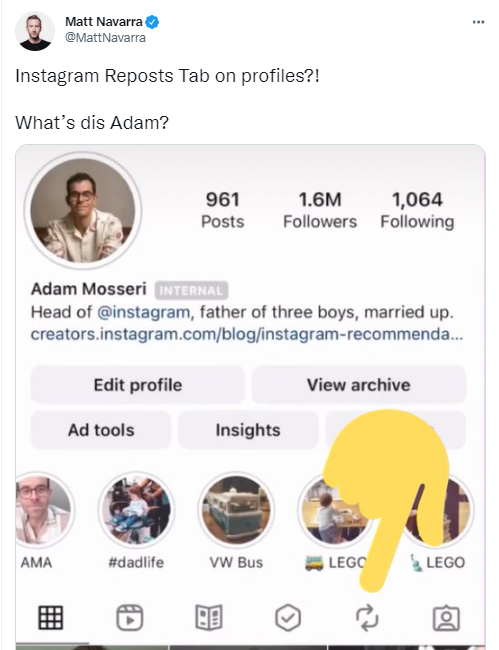
Reposting is the act of sharing someone else’s content on your own Instagram account. This can be done with various types of content, including photos, videos, and stories. Reposting is a great way to share inspiration, highlight community members, or simply showcase excellent content that resonates with your audience. However, unlike platforms like Twitter, where retweeting is straightforward, Instagram does not have a built-in repost function. Therefore, users must rely on third-party tools or manually save and upload content, which raises some questions about copyright and etiquette.
Why Repost Content?
There are several reasons why individuals and brands choose to repost content on Instagram:
- Community Building: Reposting allows users to connect and build relationships within their community. By acknowledging others and sharing their work, users can foster goodwill and engagement.
- Diversifying Content: For brands and influencers, reposting can help diversify their content mix, ensuring their feed remains fresh and engaging without requiring constant original creation.
- Capitalizing on Trends: When something goes viral, sharing trending content can help users benefit from the momentum and increase their visibility.
- Sharing Inspiration: Many users repost content that inspires them, helping to promote various ideas and themes within their niche or community.
The Ethics of Reposting
Before diving into how to repost content, it’s crucial to discuss the ethical considerations associated with it. Copyright infringement is a serious issue on Instagram, and respecting the original creator’s rights is essential. Here are some guidelines to follow:
- Ask for Permission: Whenever possible, reach out to the original content creator to obtain permission to repost their work. This simple step shows respect and helps avoid potential conflicts.
- Credit the Creator: Always give credit to the original creator by tagging them in the caption or through a tag on the content. This acknowledges their effort, and can potentially drive new followers to their account.
- Use Reposting Tools: Some tools facilitate the reposting process while ensuring that credit is given to the original creators. These tools often automatically include the original creator’s username when reposting, which helps maintain ethical standards.
Tools for Reposting Content
There are several tools available that simplify the reposting process. Here are some popular options:
- Repost for Instagram: This mobile app allows users to repost content easily while giving credit to the original creator. It has an intuitive interface and works seamlessly with the Instagram app.
- InstaRepost: Similar to Repost for Instagram, this app allows users to download and share posts, ensuring credits are maintained.
- Canva: Though primarily a design tool, Canva allows you to create engaging visuals that can incorporate reposted materials, especially useful for creating Instagram Stories.
- Buffer or Hootsuite: These social media management tools also allow users to schedule reposts along with original content, helping brands maintain a consistent posting schedule.
How to Repost Instagram Content
Now that you’ve covered the necessity of ethical reposting and have some great tools at your disposal, here’s a step-by-step guide on how to repost Instagram content effectively:
- Find Content to Repost: Browse the Instagram feed or search for specific hashtags related to your niche to discover engaging content. Remember to focus on quality over quantity!
- Request Permission: If you find something you’d like to repost, send the original creator a direct message asking for permission. It’s courteous and can foster goodwill.
- Use a Reposting Tool: Open your chosen reposting app, copy the link to the post you want to share, and follow the app’s instructions to repost while giving credit.
- Edit as Necessary: You can add your own commentary, hashtags, or personal touch in the caption to make the repost more compelling and relevant to your audience.
- Engage with Your Audience: After reposting, encourage your audience to engage with the post by asking them questions or inviting comments. This interaction can help boost your visibility through Instagram’s algorithm.
Creating Your Repost Strategy
To maximize the benefits of reposting, consider developing a reposting strategy that aligns with your overall branding and goals. Here are some tips for creating an effective reposting strategy:
- Consistency is Key: Regularly reposting content can keep your feed dynamic and engaging. Establish a repost schedule that works for you.
- Maintain Your Brand Voice: Ensure that the content you repost aligns with your brand aesthetic and voice. Not every trending post will fit seamlessly into your existing content, so choose wisely.
- Engage Creatively: Use reposted content as a springboard for original content. For example, if you repost a quote, consider creating a discussion post around that quote or a story that addresses the same theme.
- Analyze Performance: Keep track of which reposted content resonates most with your audience. Use metrics such as engagement rates and follower growth to refine your strategy.
Conclusion
Reposting Instagram content is a powerful tool for building community, diversifying content, and maximizing creativity. By understanding the ethical implications, leveraging the right tools, and following a structured strategy, users can effectively repurpose amazing content while honoring the contributions of original creators. Whether you’re an individual looking to enhance your profile or a brand aiming to increase your reach, mastering the art of reposting can lead to a more engaged audience and a richer social media experience.